

Webhook
The Webhook integration sends HTTP POST requests to your API endpoints when StackHawk events occur. Use webhooks to connect StackHawk with internal tools, custom dashboards, or any service that accepts HTTP callbacks.
Overview
Configure webhooks to receive notifications for any of these events:
Scan Events
| Event | Description |
|---|---|
| Scan Started | Fires when a scan begins |
| Scan Completed | Fires when a scan finishes successfully, includes findings data |
| Scan Errored | Fires when a scan encounters an error |
Audit Log Events
| Event | Description |
|---|---|
| User Activity | Fires on user actions within your organization, such as inviting users, adding API keys, modifying integrations, and more |
| Organization Activity | Fires on organization-level events such as triaged alerts sent to third parties |
Each webhook request includes a JSON payload with event details. You can configure custom authentication headers, filter by specific event types, and test webhooks before enabling them for production use.
Requirements
- A StackHawk account
- A plan with the Webhook Integration enabled. Contact StackHawk Support to enable it.
Setup
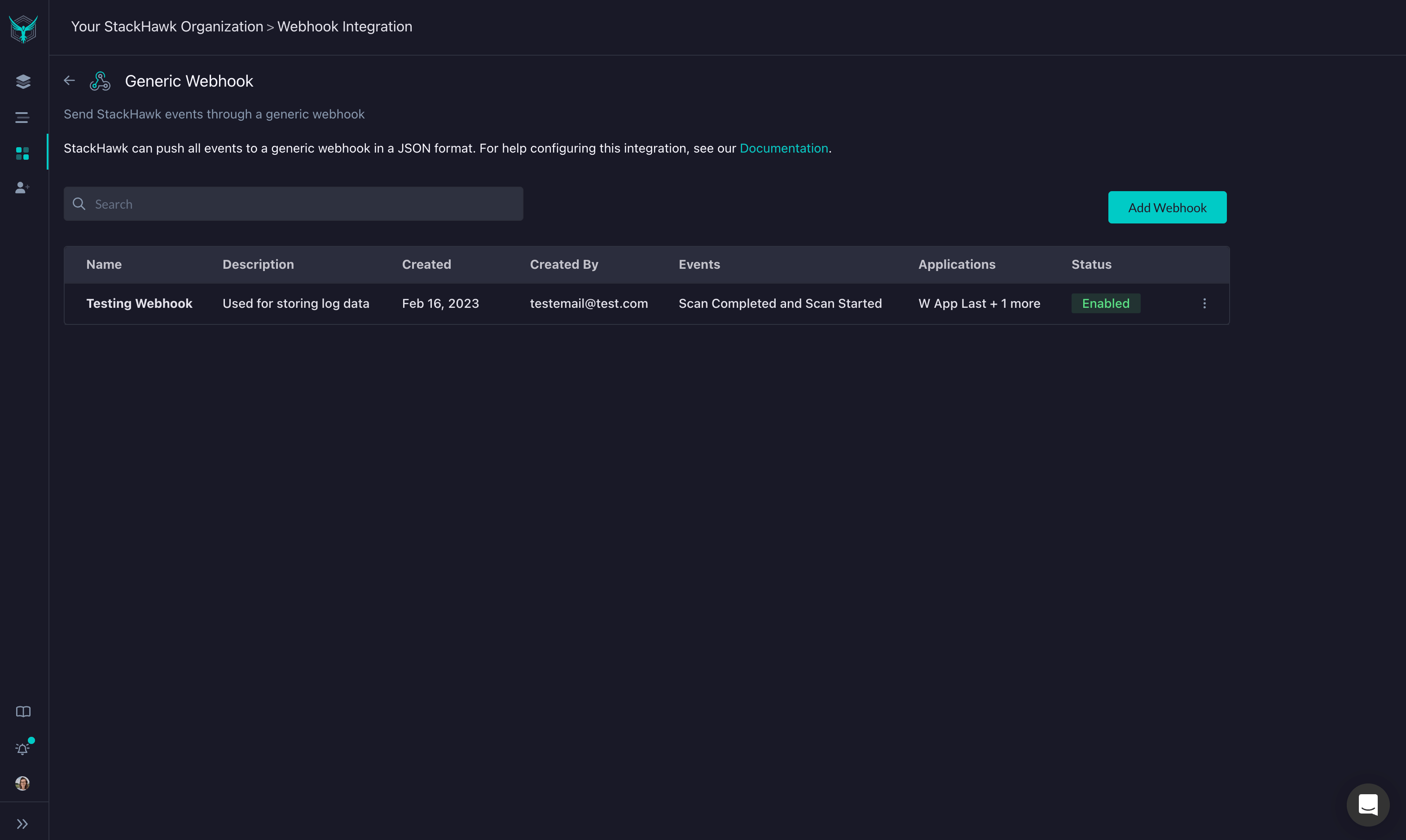
- Log into StackHawk and navigate to the Webhook Integration page.
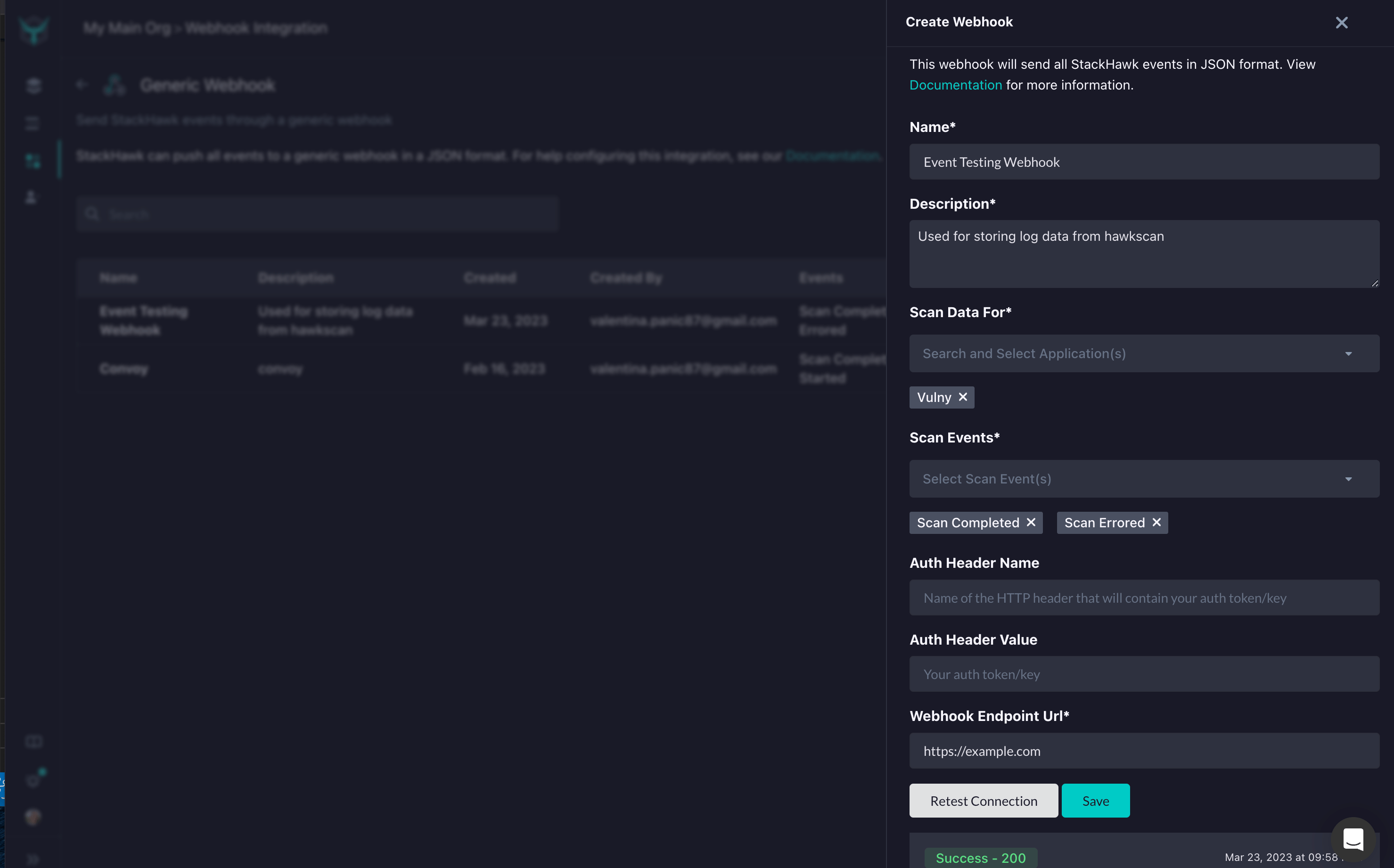
- Click Add Webhook. In the panel that opens, configure:
- Name and Description
- Scan Data For — select target application(s) or “All Applications”
- Events — select which events trigger the webhook (e.g. Scan Started, Scan Completed, Scan Errored, User Activity, Organization Activity)
- User Activity Types — optionally filter which user activities to receive (leave empty for all)
- Organization Activity Types — optionally filter which organization activities to receive (leave empty for all)
- Auth Header Name and Auth Header Value — optional authentication headers
- Webhook Endpoint URL — your HTTPS endpoint
- Click Save. StackHawk sends a test payload and displays the response. Use Test to send additional test requests for debugging.
- Toggle the webhook to Enabled to start receiving live events.
Allowed IP Addresses
If your Webhook Consumer has access restricted by IP address, please add the following IP addresses to the allowed list:
44.227.38.18954.69.98.3344.227.81.160
Webhook Management
Click the … menu on any webhook to access management options:
| Action | Description |
|---|---|
| Edit | Modify webhook settings, endpoint, or event triggers |
| Enable/Disable | Toggle whether the webhook receives live events |
| Delete | Remove the webhook permanently |
Payload
Enabled webhooks receive a JSON payload via HTTP POST for each triggered event. If you configured authentication headers, they are included in the request.
Scan Completed
The Scan Completed payload includes:
- Scan metadata (ID, application, environment, timestamps)
- Findings with vulnerability details and affected paths
- CompletedScanStats summary of findings by severity and triage status
Example payload:
{
  "service": "StackHawk",
  "scanCompleted": {
    "scan": {
      "id": "21a4f2da-740b-40d9-9557-696d8aca6a76",
      "hawkscanVersion": "4.0.0",
      "env": "Development",
      "status": "COMPLETED",
      "application": "Contosso",
      "startedTimestamp": "2021-05-18T00:26:41.892Z",
      "scanURL": "https://app.stackhawk.com/scans/21a4f2da-740b-40d9-9557-696d8aca6a76",
      "tags": [
        {
          "name": "category",
          "value": "${CATEGORY_FROM_ENV:default}"
        }
      ]
    },
    "scanDuration": "1",
    "spiderDuration": "33",
    "completedScanStats": {
      "urlsCount": "5",
      "duration": "34",
      "scanResultsStats": {
        "totalCount": "3",
        "lowCount": "2",
        "mediumCount": "0",
        "highCount": "0",
        "lowTriagedCount": "0",
        "mediumTriagedCount": "1",
        "highTriagedCount": "0"
      }
    },
    "findings": [
      {
        "pluginId": "10106",
        "pluginName": "HTTP Only Site",
        "severity": "Medium",
        "host": "http://localhost:8080",
        "paths": [
          {
            "path": "/test",
            "method": "GET",
            "status": "FALSE_POSITIVE",
            "pathURL": "https://app.stackhawk.com/scans/21a4f2da-740b-40d9-9557-696d8aca6a76/finding/10106/path/61036/message/49"
          }
        ],
        "pathStats": [
          {
            "status": "FALSE_POSITIVE",
            "count": 1
          }
        ],
        "totalCount": "1",
        "category": "HTTP Data Stream Protection",
        "findingURL": "https://app.stackhawk.com/scans/21a4f2da-740b-40d9-9557-696d8aca6a76/finding/10106"
      },
      {
        "pluginId": "10021",
        "pluginName": "X-Content-Type-Options Header Missing",
        "severity": "Low",
        "host": "http://localhost:8080",
        "paths": [
          {
            "path": "",
            "method": "GET",
            "status": "NEW",
            "pathURL": "https://app.stackhawk.com/scans/21a4f2da-740b-40d9-9557-696d8aca6a76/finding/10021/path/32294/message/8"
          },
          {
            "path": "/",
            "method": "GET",
            "status": "NEW",
            "pathURL": "https://app.stackhawk.com/scans/21a4f2da-740b-40d9-9557-696d8aca6a76/finding/10021/path/31943/message/1"
          }
        ],
        "pathStats": [
          {
            "status": "NEW",
            "count": 2
          }
        ],
        "totalCount": "2",
        "category": "Information Leakage",
        "findingURL": "https://app.stackhawk.com/scans/21a4f2da-740b-40d9-9557-696d8aca6a76/finding/10021"
      }
    ]
  }
}
Scan
Metadata for a HawkScan run.
{
  "id": "21a4f2da-740b-40d9-9557-696d8aca6a76", // The scan id
  "hawkscanVersion": "4.0.0", // The version of HawkScan used for this scan
  "env": "Development", // The name of the scanned application
  "status": "COMPLETED", // one of either STARTED COMPLETED or ERROR
  "application": "Contosso", // scanned application
  "startedTimestamp": "2021-05-18T00:26:41.892Z", // ISO-8601 timestamp of when the scan was started
  "scanURL": "https://app.stackhawk.com/scans/21a4f2da-740b-40d9-9557-696d8aca6a76", // link to the StackHawk Platform for this specific scanned path
  "tags": [
    {
      "name": "category", // Tag names
      "value": "${CATEGORY_FROM_ENV:default}" // Tag value interpolated from environment
    }
  ]
}
CompletedScanStats
Summary of scan results including finding counts by severity and triage status.
{
  "urlsCount": 27, // Number of scanned urls
  "duration": 44, // Time in seconds for the scan to run
  "scanResultsStats": {
    "totalCount": 12, // Total number of findings
    "lowCount": 5, // Total number of low findings
    "mediumCount": 4, // Total number of medium findings
    "highCount": 3, // Total number of high findings
    "lowTriagedCount": 2, // Total number of low findings that have been triaged
    "mediumTriagedCount": 0, // Total number of medium findings that have been triaged
    "highTriagedCount": 1 // Total number of high findings that have been triaged
  }
}
Finding
An individual vulnerability detected during the scan. Each finding includes Paths (specific endpoints affected) and PathStats (triage status counts).
{
  "pluginId": "40012", // The Id of the scanner extension that reported the finding
  "pluginName": "Cross Site Scripting (Reflected)", // Name of the plugin or vulnerability found
  "category": "Input Sanitization", // What vulnerability category this corresponds to
  "severity": "High", // High, Medium or Low criticality of the finding
  "host": "http://localhost:3333", // The web application host that was scanned
  "paths": [ ... ], // a list of all paths
  "pathStats": [ ... ], // a list of statistics for the found paths
  "totalCount": 4, // how many scanned paths correspond with this finding
  "findingURL": "https://app.stackhawk.com/scans/21a4f2da-740b-40d9-9557-696d8aca6a76/finding/40012" // link to the StackHawk Platform for this finding's overview.
}
PathStats
Count of paths grouped by triage status.
{
  "status": "NEW", // one of either NEW, FALSE_POSITIVE, RISK_ACCEPTED or PROMOTED
  "count": "1" // how many of the paths are triaged with that status
}
Path
A specific endpoint where the vulnerability was detected.
{
  "path": "/?option=javascript:alert(1);&search=ZAP&utf8=✓", // The specific path relative to the hostname
  "method": "POST", // HTTP method or GraphQL operation
  "status": "NEW", // one of either NEW, FALSE_POSITIVE, RISK_ACCEPTED or PROMOTED
  "pathUrl": "https://app.stackhawk.com/scans/21a4f2da-740b-40d9-9557-696d8aca6a76/finding/40012/path/595936/message/258" // link to the StackHawk Platform for this scanned path
}
Audit Event
The Audit Event payload fires when user or organization activity occurs within your StackHawk organization. You can configure webhooks to receive all audit events or filter by specific activity types.
Example payload:
{
  "service": "StackHawk",
  "auditEvent": {
    "eventId": "a1b2c3d4-e5f6-7890-abcd-ef1234567890",
    "eventType": "USER_ACTIVITY",
    "eventAction": "API_KEY_ADDED",
    "organizationId": "12345678-abcd-1234-efgh-123456789012",
    "userId": "87654321-dcba-4321-hgfe-210987654321",
    "userName": "Jane Smith",
    "userEmail": "jane@example.com",
    "userIPAddr": "192.168.1.100",
    "payload": "{\"apiKeyName\":\"CI/CD Key\"}",
    "timestamp": "2025-03-15T14:30:00.000Z"
  }
}
AuditEventMessage
Details about the audit activity that triggered the webhook.
{
  "eventId": "a1b2c3d4-e5f6-7890-abcd-ef1234567890", // Unique identifier for this audit event
  "eventType": "USER_ACTIVITY", // Either "USER_ACTIVITY" or "ORG_ACTIVITY"
  "eventAction": "API_KEY_ADDED", // The specific action that occurred (see tables below)
  "organizationId": "12345678-abcd-1234-efgh-123456789012", // The organization where the activity occurred
  "userId": "87654321-dcba-4321-hgfe-210987654321", // The user who performed the action
  "userName": "Jane Smith", // Display name of the user
  "userEmail": "jane@example.com", // Email address of the user
  "userIPAddr": "192.168.1.100", // IP address of the user
  "payload": "{\"apiKeyName\":\"CI/CD Key\"}", // JSON string with event-specific details
  "timestamp": "2025-03-15T14:30:00.000Z" // ISO-8601 timestamp of when the event occurred
}
User Activity Types
When eventType is USER_ACTIVITY, the eventAction field contains one of the following values:
| Action | Description |
|---|---|
INVITE_USER | A user was invited to the organization |
USER_INVITE_REVOKED | A pending invitation was revoked |
REMOVE_USER | A user was removed from the organization |
USER_JOINED_ORG | A new user joined the organization |
USER_MODIFIED | A user’s settings were changed |
USER_PASSWORD_MODIFIED | A user’s password was changed |
USER_PREFERENCES_MODIFIED | A user’s preferences were updated |
USER_CONVERTED_TO_SAML_IDP | A user was converted to SAML-based SSO |
SCAN_STARTED | A scan was started |
SCAN_COMPLETED | A scan completed |
SCAN_ERRORED | A scan encountered an error |
SCAN_REMOVED | A scan was deleted |
INTEGRATION_ADDED | An integration was added |
INTEGRATION_MODIFIED | An integration was changed |
INTEGRATION_REMOVED | An integration was removed |
INTEGRATION_START_AUTHORIZATION | An integration authorization flow started |
APPLICATION_ADDED | An application was added |
APPLICATION_MODIFIED | An application was changed |
APPLICATION_REMOVED | An application was removed |
APPLICATION_CONFIGURATION_UPDATED | An application’s hosted scan configuration was updated |
APPLICATIONS_ADDED_FOR_REPOS | Applications were created and added to repositories |
ENVIRONMENT_ADDED | An environment was added |
ENVIRONMENT_MODIFIED | An environment was changed |
ENVIRONMENT_REMOVED | An environment was removed |
API_KEY_ADDED | An API key was created |
API_KEY_REMOVED | An API key was removed |
ALERT_RULE_TRIAGED | An alert was triaged |
ALERT_RULE_REMOVED | An alert rule was removed |
TECH_FLAG_ADDED | A technology flag was added to an application |
TECH_FLAG_MODIFIED | A technology flag was changed |
TECH_FLAG_REMOVED | A technology flag was removed |
SCAN_CONFIG_MODIFIED | A scan configuration was changed |
DOWNLOAD_SCAN_ASSET | A scan asset was downloaded |
SUBSCRIPTION_MODIFIED | A billing subscription was changed |
SUBSCRIPTION_ADDED | A billing subscription was added |
ORG_DOWNGRADED | The organization was downgraded |
ORG_MODIFIED | The organization was modified |
ORG_SETTINGS_MODIFIED | The organization settings were changed |
CUSTOM_TEST_SCRIPT_ADDED | A custom test script was added |
CUSTOM_TEST_SCRIPT_REMOVED | A custom test script was removed |
APPLICATION_POLICY_MODIFIED | An application scan policy was changed |
ORGANIZATION_POLICY_ADDED | An organization scan policy was added |
ORGANIZATION_POLICY_MODIFIED | An organization scan policy was changed |
ORGANIZATION_POLICY_REMOVED | An organization scan policy was removed |
ORGANIZATION_CONFIGURATION_ADDED | An organization scan configuration was added |
ORGANIZATION_CONFIGURATION_MODIFIED | An organization scan configuration was changed |
ORGANIZATION_CONFIGURATION_REMOVED | An organization scan configuration was removed |
TEAM_ADDED | A team was created |
TEAM_UPDATED | A team was updated |
TEAM_DELETED | A team was deleted |
REPO_MODIFIED | A repository was updated |
REPO_REMOVED | A repository was removed |
USER_SECRET_ADDED | A user secret was created |
USER_SECRET_REMOVED | A user secret was removed |
USER_SECRET_USED | A user secret was referenced |
BUILD_OPEN_API_SPEC_REQUESTED | An OpenAPI spec build was requested |
USER_PERCH_KEY_REQUESTED | A Perch key was requested |
USER_PERCH_KEY_VALIDATED | A Perch key was validated |
Organization Activity Types
When eventType is ORG_ACTIVITY, the eventAction field contains one of the following values:
| Action | Description |
|---|---|
EXTERNAL_ALERTS_TRIAGED | Alerts were triaged by a third-party integration |
Some organization activity types are internal to StackHawk and are excluded from webhook delivery to prevent recursion. Only externally relevant events are sent.
Feedback
Have any suggestions, feature requests, or feedback to share? Contact StackHawk Support.