

Roles
This feature is available on the StackHawk Enterprise plan.
Roles control what users can access and modify in StackHawk. Assign roles based on each user’s responsibilities to maintain proper access control across your organization.
Role Definitions in StackHawk
- Owner: The highest access level in StackHawk, with access to all functionality.
- Admin: Has all access except Billing.
- Team Admin: Manages users, applications, and scan policy within assigned teams. Cannot access organization settings, integrations, or billing.
- Member: Limited access to organization features.
- View Only: Read-only auditor access. Can view all organization data across all teams but cannot modify any resources.
Team Admin
Can:
- Invite new users as Members to their teams
- Promote Members to Team Admin within the organization
- Remove members from their teams
- Create, modify, and remove applications on their teams
- Move unassigned applications into their teams
- View and modify Scan Policy for their team’s applications
Cannot:
- Remove users from the organization
- Access applications assigned to other teams
- Delete scan policies
- View or change Organization settings
- Add or configure Integrations
- Access Billing
Member
Cannot:
- View or change Organization settings
- Add or configure Integrations
- Invite or modify Users
- Modify Teams
- View or change Scan Policy for Applications
Can:
- Create, modify, and remove Applications on assigned Teams
- Create, modify, and remove unassigned Applications
View Only
The View Only role provides read-only auditor access across your organization. View Only users can see all data — including applications, scans, findings, teams, members, integrations, billing, and audit logs — but cannot modify anything. This role is ideal for security auditors, compliance reviewers, or stakeholders who need visibility without the ability to make changes.
Can:
- View all applications, scans, and findings across all teams
- View organization members, teams, and role assignments
- View integrations, scan policies, and scan configurations
- View billing information and audit logs
- View reports and repositories
- Create and manage API keys (keys inherit the View Only permission set, so they are effectively read-only)
- Edit their own user profile
Cannot:
- Create, modify, or delete applications
- Run, configure, or delete scans
- Triage findings or manage alert rules
- Invite, modify, or remove users
- Create, modify, or delete teams
- Add, configure, or remove integrations
- Manage billing or change plans
- Modify organization settings or scan policies
- Assign roles to other users
Role Management
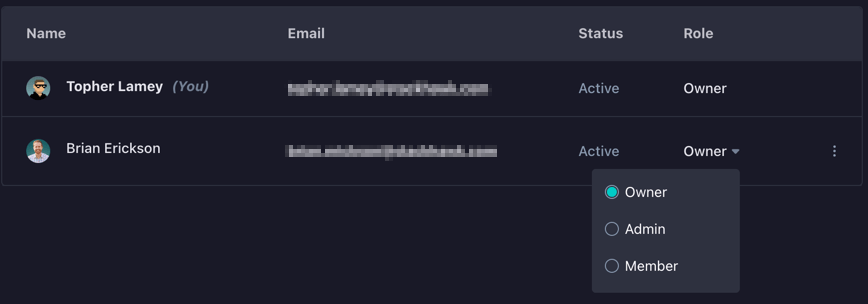
Roles are configured from the Users page in the main navigation. In the list of users displayed, a user’s role can be changed via the dropdown in the Role column.
Role Hierarchy
Roles can’t make changes “above” their rank in the hierarchy. For example, Members don’t have access to the Users page and can’t change any roles. Admins have access to the Users page but can’t change an Owner’s role.
| Role | Can Modify |
|---|---|
| Owner | All users (Owner, Admin, Team Admin, Member, View Only) |
| Admin | Admin, Team Admin, Member, and View Only users |
| Team Admin | Team Admin, Member, and View Only users |
| Member | Cannot modify any roles |
| View Only | Cannot modify any roles |